# Valid Sign Tutorial

## Sign

When you want to sign a message you sent to prove that the message originated from you, you can take the following approach.

### 1. Post your Text

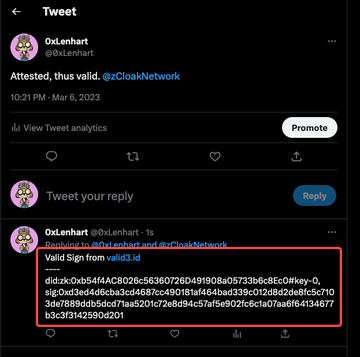
For example, you want to post one message with a valid signature on Twitter.

<figure><img src="https://2923019736-files.gitbook.io/~/files/v0/b/gitbook-x-prod.appspot.com/o/spaces%2FPyTaKhWwUGKqrJEcGaW5%2Fuploads%2F6HKM1X2ae89AWrKICuki%2F1.png?alt=media&#x26;token=1c5829a3-66f2-4158-8dc3-f790127a29f4" alt=""><figcaption></figcaption></figure>

### 2. Login Valid Sign Platform via zkID Wallet

You need to login to signature this message. Here is the link of Valid Sign Platform: <https://sign.valid3.id/>

<figure><img src="https://2923019736-files.gitbook.io/~/files/v0/b/gitbook-x-prod.appspot.com/o/spaces%2FPyTaKhWwUGKqrJEcGaW5%2Fuploads%2FdTApEfssk2LxYz5ImaC5%2F2.png?alt=media&#x26;token=188a11d3-f407-440f-b752-384721957488" alt=""><figcaption></figcaption></figure>

<figure><img src="https://2923019736-files.gitbook.io/~/files/v0/b/gitbook-x-prod.appspot.com/o/spaces%2FPyTaKhWwUGKqrJEcGaW5%2Fuploads%2F9BrjfhyGG0wGdzuX0CGi%2F2.2.png?alt=media&#x26;token=427455b9-4d84-4113-82c7-b5a5ed5bfdb3" alt=""><figcaption></figcaption></figure>

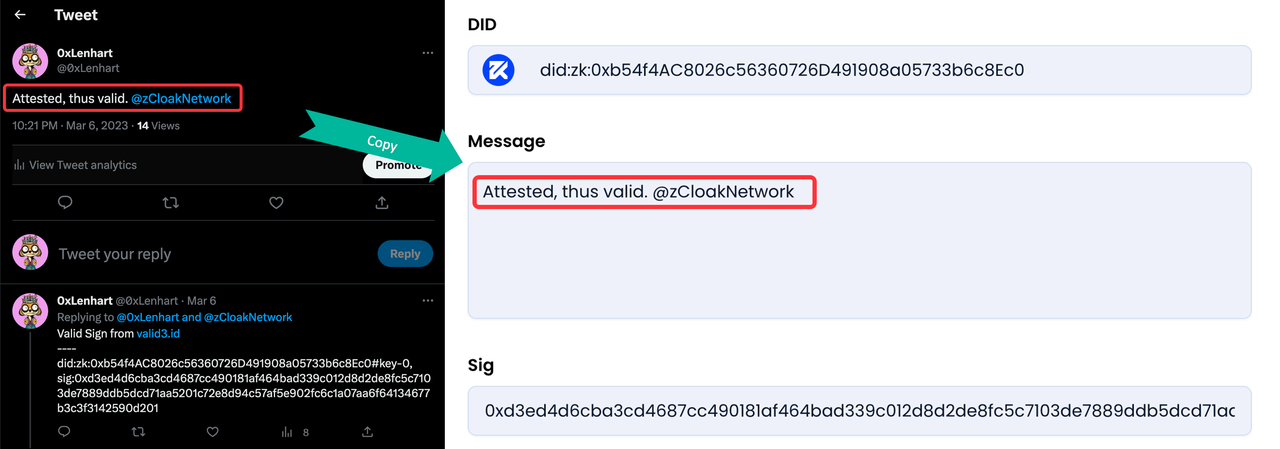
### 3. Paste the message and sign via zkID Wallet

<figure><img src="https://2923019736-files.gitbook.io/~/files/v0/b/gitbook-x-prod.appspot.com/o/spaces%2FPyTaKhWwUGKqrJEcGaW5%2Fuploads%2FMZPT1dbCx5HJhum3Djge%2F3.png?alt=media&#x26;token=a114cfc9-6ecd-4aac-a810-e53fad20829d" alt=""><figcaption></figcaption></figure>

### 4. Copy the signature information and reply to your original post to make sure others can see your signature

<figure><img src="https://2923019736-files.gitbook.io/~/files/v0/b/gitbook-x-prod.appspot.com/o/spaces%2FPyTaKhWwUGKqrJEcGaW5%2Fuploads%2FttmdztiaVuGZvvFbsg5R%2F4.png?alt=media&#x26;token=35f06901-8ff1-4ba9-9645-67da6ba4778a" alt=""><figcaption></figcaption></figure>

## Verify

If you saw 0xLenhart's post, you can verify his signature as follows.

### 1. Login Valid Sign Platform and paste the signature information

Here is the link of Valid Sign Platform: <https://sign.valid3.id>

<figure><img src="https://2923019736-files.gitbook.io/~/files/v0/b/gitbook-x-prod.appspot.com/o/spaces%2FPyTaKhWwUGKqrJEcGaW5%2Fuploads%2FsLyi2a5LuAkKTXvt4zbE%2F-1.png?alt=media&#x26;token=51b2a83d-f9a9-4a93-8d9e-ce1c18088d50" alt=""><figcaption></figcaption></figure>

### 2. Copy the original message and paste it

<figure><img src="https://2923019736-files.gitbook.io/~/files/v0/b/gitbook-x-prod.appspot.com/o/spaces%2FPyTaKhWwUGKqrJEcGaW5%2Fuploads%2FCCvIPqWR8RQO07lrsm3G%2F-2.png?alt=media&#x26;token=ea4e3ebb-bc4f-45c5-adc0-a5a54c70e293" alt=""><figcaption></figcaption></figure>

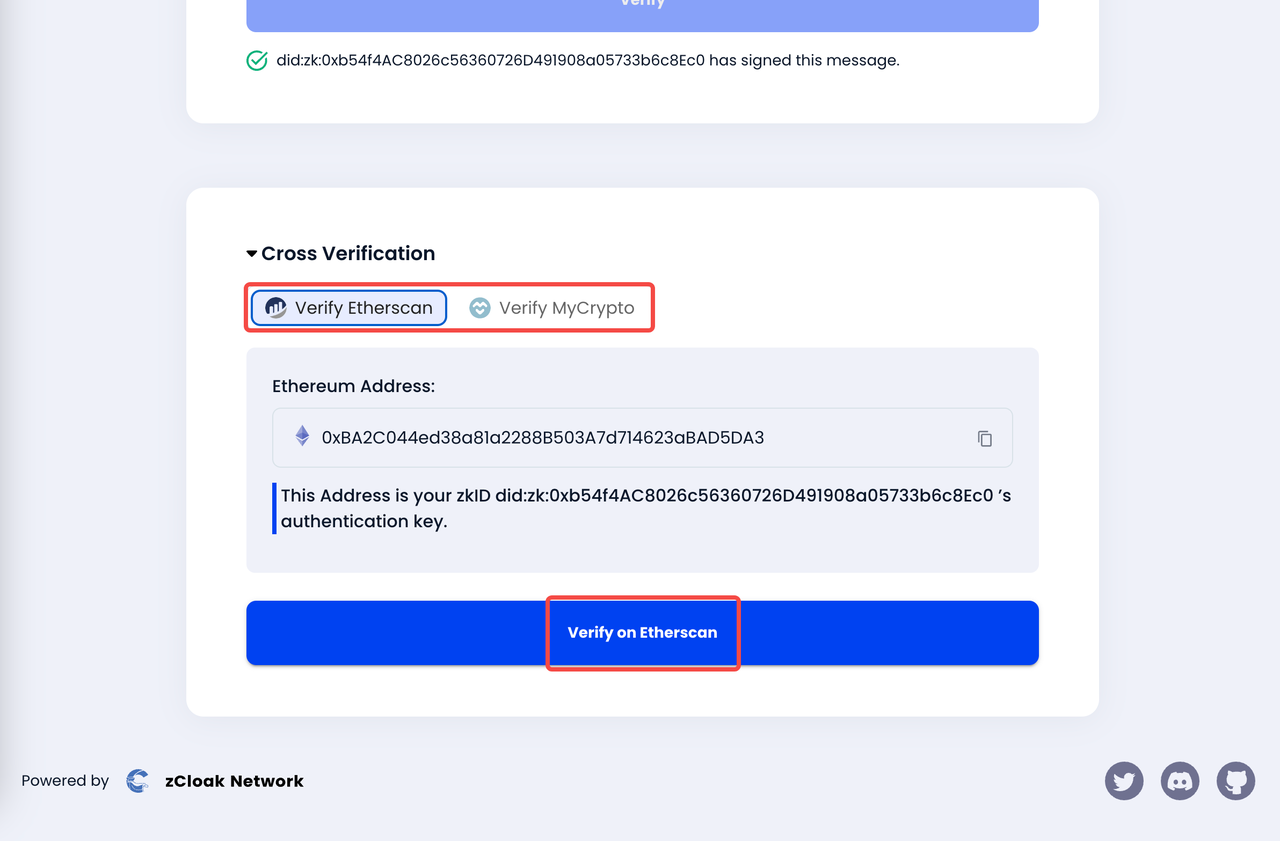
### 3. Verify it to get the result

<figure><img src="https://2923019736-files.gitbook.io/~/files/v0/b/gitbook-x-prod.appspot.com/o/spaces%2FPyTaKhWwUGKqrJEcGaW5%2Fuploads%2FRrZvv3yjwyGRD0ttXq9a%2F-3.png?alt=media&#x26;token=0fa95016-3bf2-4a01-9164-773c3aab093d" alt=""><figcaption></figcaption></figure>

You can also see the cross verification results at the bottom of the page

<figure><img src="https://2923019736-files.gitbook.io/~/files/v0/b/gitbook-x-prod.appspot.com/o/spaces%2FPyTaKhWwUGKqrJEcGaW5%2Fuploads%2FvAdLivk3OtE2bnPhRPHC%2F-3.1.png?alt=media&#x26;token=2344f51c-5fcb-4b21-b407-96d00867e624" alt=""><figcaption></figcaption></figure>